Pre-renewal reminder emails
This feature emails customers before their subscription renews if they don’t have a saved card on file for the ag_authipay_checkout gateway. Emails use the native WooCommerce email template (header/footer/styles) via WC()->mailer()->wrap_message().
When it runs (cron)
- Cron hook name:
ag_authipay_checkout_pre_renewal_reminders
We attach this hook toAG_authipay_Checkout::<method> ag_authipay_checkout_send_pre_renewal_reminders().
Manually trigger the job
WP-CLI
PHP (one-off)
Tip: If your host disables WP-Cron, set a real cron to hit wp-cron.php or call the CLI periodically.
What it does (at a glance)
- Scans active WooCommerce Subscriptions.
- Filters to those using gateway ID: ag_authipay_checkout.
- Skips customers who already have a saved token for this gateway.
- Sends:
- A customer Woo-styled email with a link to My Account → Payment methods.
- An optional admin heads-up email (can be disabled).
Prevents duplicates by storing the next renewal timestamp in _ag_authi_reminder_sent_for.

Customer email (default) — before any custom filters
Shows the WooCommerce-styled reminder the customer receives: subject “Action needed: Add a card to avoid subscription interruption,” heading “Your {STORE_NAME} subscription renews soon,” with the next payment date and a link to My Account → Payment methods.
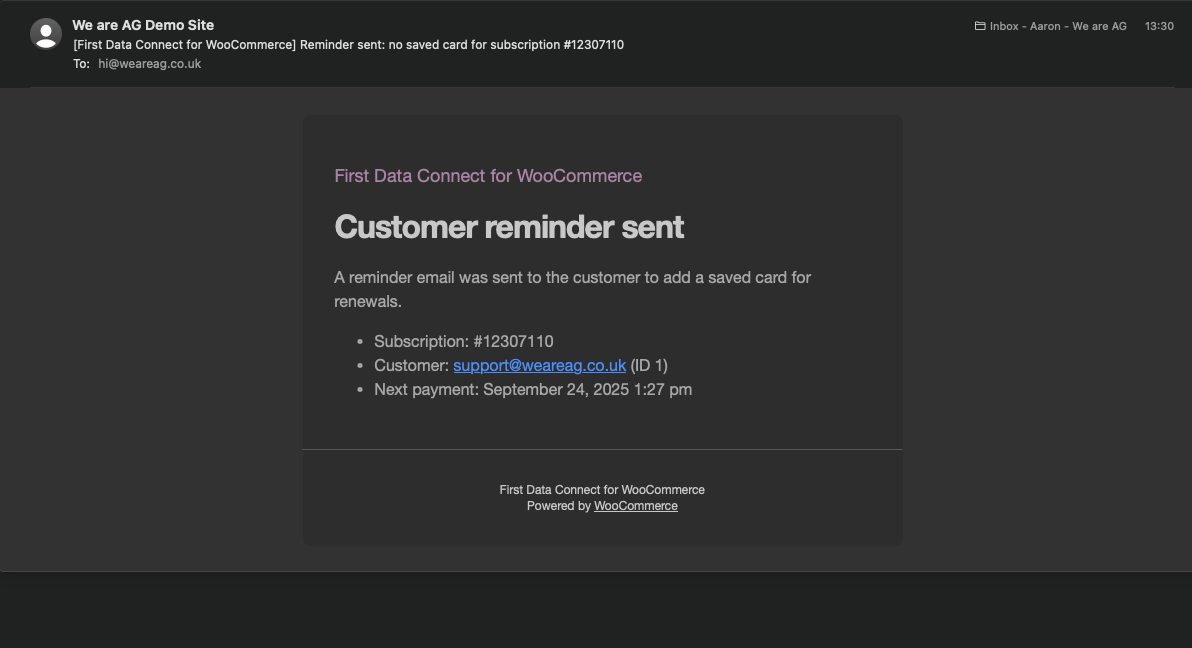
Admin email (default) — before any custom filters
Shows the WooCommerce-styled admin notification: subject “[{STORE_NAME}] Reminder sent: no saved card for subscription #{SUBSCRIPTION_ID},” heading “Customer reminder sent,” with subscription ID, customer email/ID, next payment date.
Why this is critical for wallet payments (Apple Pay / Google Pay)
Many gateways (including ours for Authipay) cannot process subscription renewals via wallet payments. Wallet transactions are typically designed for the initial, customer-present checkout and do not provide a reusable card token suitable for merchant-initiated renewals.
That means if a customer signs up using Apple Pay or Google Pay, their first payment succeeds, but future renewals will fail unless they add a standard card on file.
These pre-renewal reminders solve that by prompting customers to add a saved card before the renewal date, preventing service interruptions.
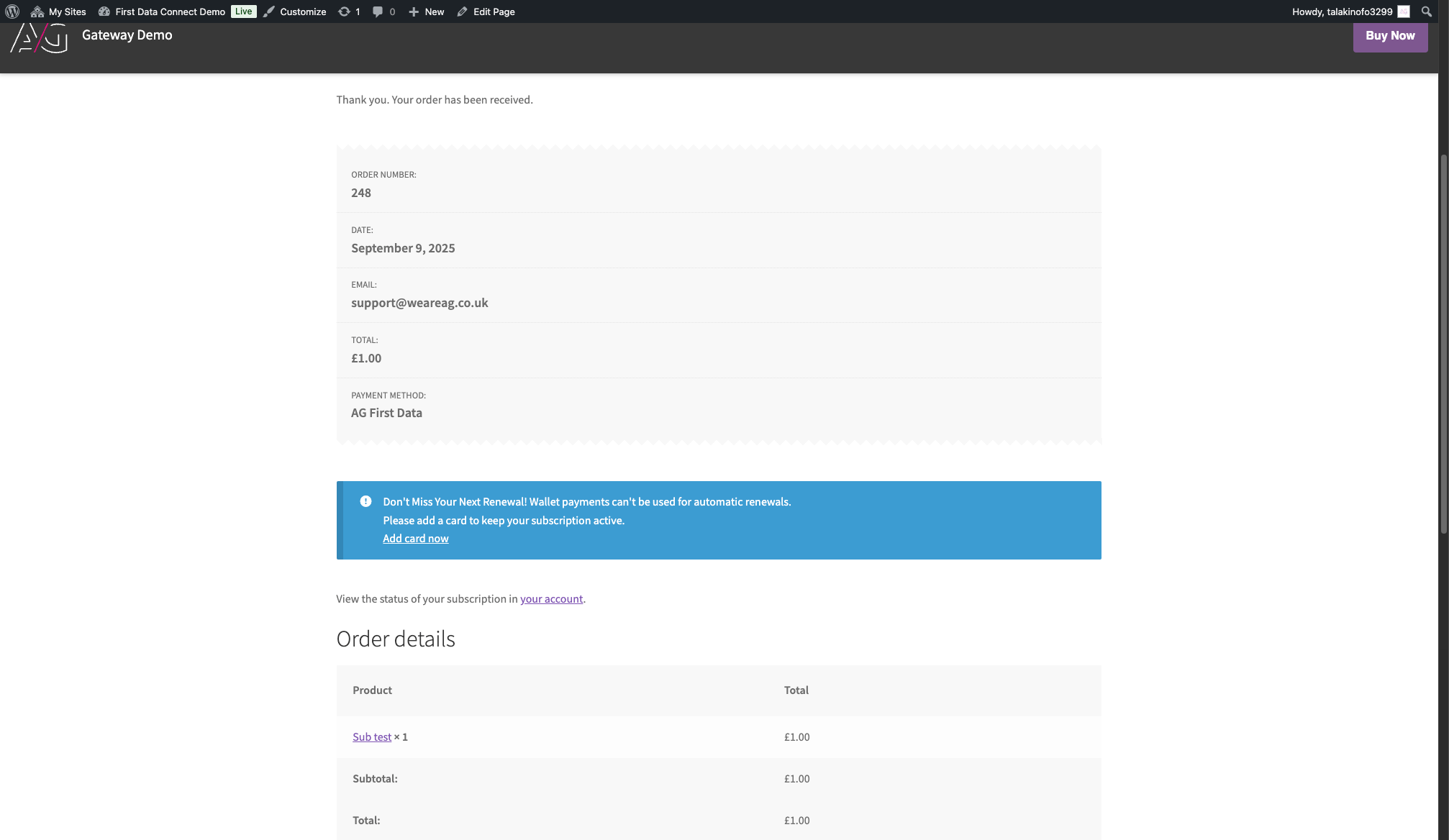
Thank You page notice (default) — shown when checkout used a wallet (Apple Pay/Google Pay). Prompts the customer to add a saved card for future renewals and links to My Account → Payment methods. (Before any changes via ag_checkout_thankyou_notice_text.)
Customisation (filters)
All filters are optional. Add these to a small “site plugin” or your theme’s functions.php.
1) ag_checkout_days_before_reminder (int)
What: How many days before the renewal date to send the reminder.
Default: 3
2) ag_checkout_admin_reminder_recipient (string|false)
What: Change the admin notification recipient, or return false to disable the admin email.
Default: get_option( ‘admin_email’ )
3) ag_checkout_email_heading_customer (string)
What: Heading shown inside the Woo email for the customer.
Default: sprintf( __( ‘Your %s subscription renews soon’, ‘ag_authipay_checkout’ ), get_bloginfo( ‘name’ ) )
4) ag_checkout_email_heading_admin (string)
What: Heading shown inside the Woo email for the admin.
Default: __( ‘Customer reminder sent’, ‘ag_authipay_checkout’ )
5) ag_checkout_email_subject_customer (string)
What: Email subject for the customer.
Default: __( ‘Action needed: Add a card to avoid subscription interruption’, ‘ag_authipay_checkout’ )
6) ag_checkout_email_subject_admin (string)
What: Email subject for the admin notification.
Default: sprintf( __( ‘[%1$s] Reminder sent: no saved card for subscription #%2$d’, ‘ag_authipay_checkout’ ), get_bloginfo( ‘name’ ), $subscription->get_id() )
7) ag_checkout_thankyou_notice_text (array)
What: Edit the Thank You page notice copy shown when the subscription signup used a wallet payment (Apple Pay / Google Pay). Lets you change the title, body, and button label. (URL and type are fixed.)
FAQ
Which gateway does this check?
Only subscriptions paid via gateway ID ag_authipay_checkout.
Will a customer get multiple reminders?
No. We record the renewal timestamp in _ag_authi_reminder_sent_for and only send once per upcoming renewal.
Where do customers go to add a card?
My Account → Payment methods, using this URL:
/my-account/payment-methods/ (we generate a safe, site-specific link in the email).
Do these emails match Woo styling?
Yes — content is wrapped with WC()->mailer()->wrap_message() and sent via WC()->mailer()->send().
Was this helpful?