Shipping options for wallet payments
Apple Pay and Google Pay handle shipping differently to standard checkout payments.
Because wallet providers only return the customer’s billing/delivery address after payment has completed, WooCommerce cannot evaluate postcode-based shipping rules when a wallet payment is used.
This means shipping zones that rely on postcodes, regions, or complex address logic may not appear when customers choose Apple Pay or Google Pay.
To avoid this, we recommend setting up a dedicated shipping zone specifically for wallet payments.
Why a separate shipping zone is required
When a customer pays using Apple Pay or Google Pay:
- shipping options must be available immediately
- the customer’s postcode is not yet known
- WooCommerce cannot determine which postcode-based zone applies
As a result:
- some shipping methods may not appear
- wallet buttons may fail to open
- customers may be unable to complete checkout
Creating a simple, wallet-friendly shipping zone ensures shipping options can always be shared with Apple Pay and Google Pay.
Recommended setup (best practice)
For the best wallet checkout experience, we recommend:
- ✅ creating a dedicated shipping zone called Wallet Payments
- ✅ using country-level rules only (for example: United Kingdom)
- ❌ avoiding postcode-based shipping zones
- ❌ avoiding large numbers of shipping methods
Wallet payment work best when only a few clear delivery options are available.
Step 1 – Create the “Wallet Payments” shipping zone
We provide a ready-to-use code snippet that creates a wallet-friendly shipping zone for you.
This shipping zone:
- is named Wallet Payments
- matches UK customers at country level only
- does not rely on postcodes
- is hidden from the standard WooCommerce checkout
- is intended to be used only with Apple Pay and Google Pay
View the shipping zone setup code:
https://gist.github.com/AaronBowie/75691efe3ff85db823d3aa74cb37ea63
Once added, the new zone will appear under:
WooCommerce → Settings → Shipping → Wallet Payments
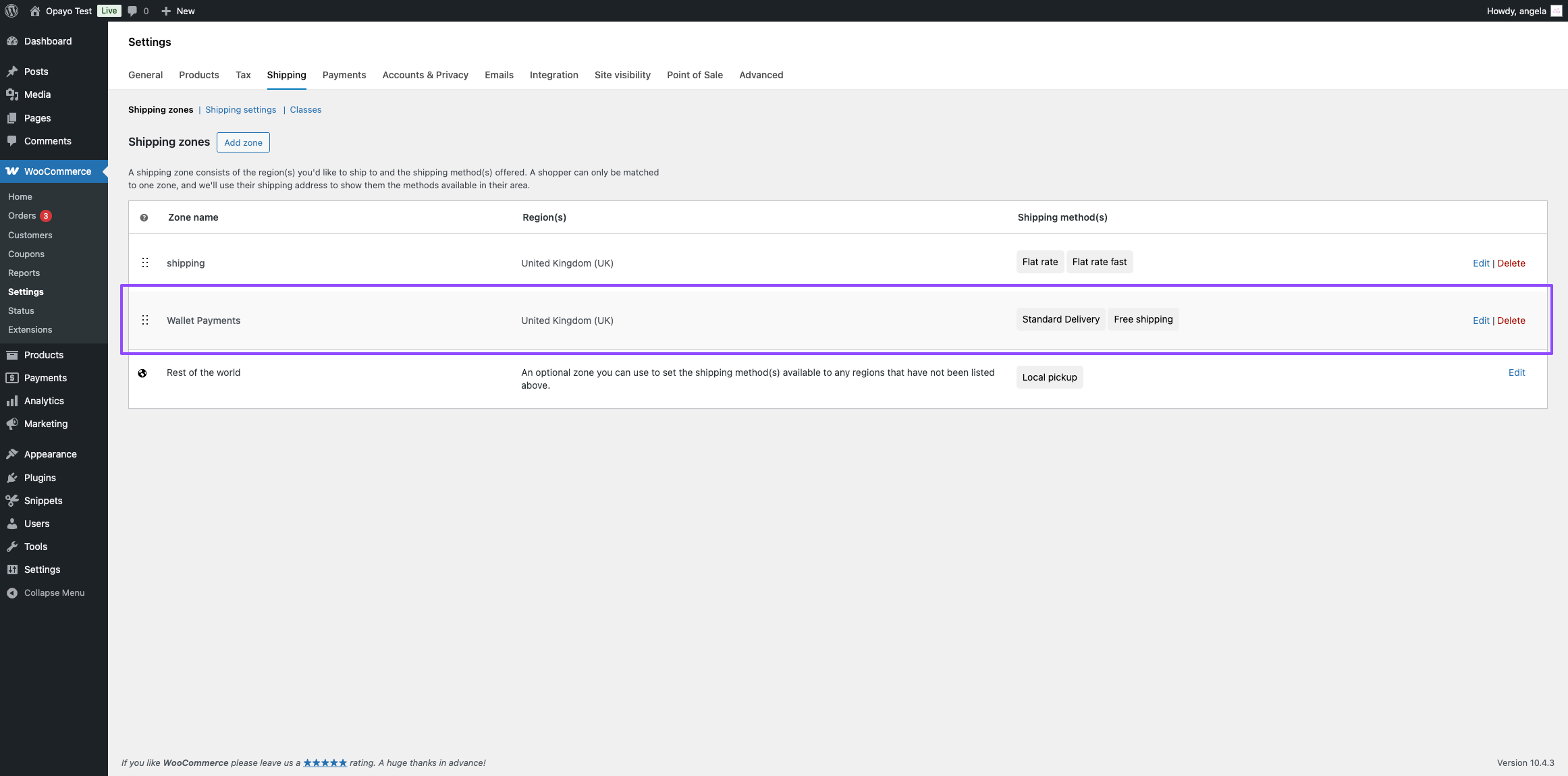
Step 2 – Add shipping methods to the Wallet Payments zone
Inside the Wallet Payments shipping zone, add the delivery options you want to offer for wallet payments.
Common examples include:
- Standard Delivery
- Free Shipping
We recommend keeping wallet shipping simple to avoiding friction and increase the risk of abandoned orders.
Step 3 – Configure wallet shipping options in the plugin
In your Opayo plugin settings, go to:
Opayo Pi → Wallet → Shipping Options for Wallet Payments
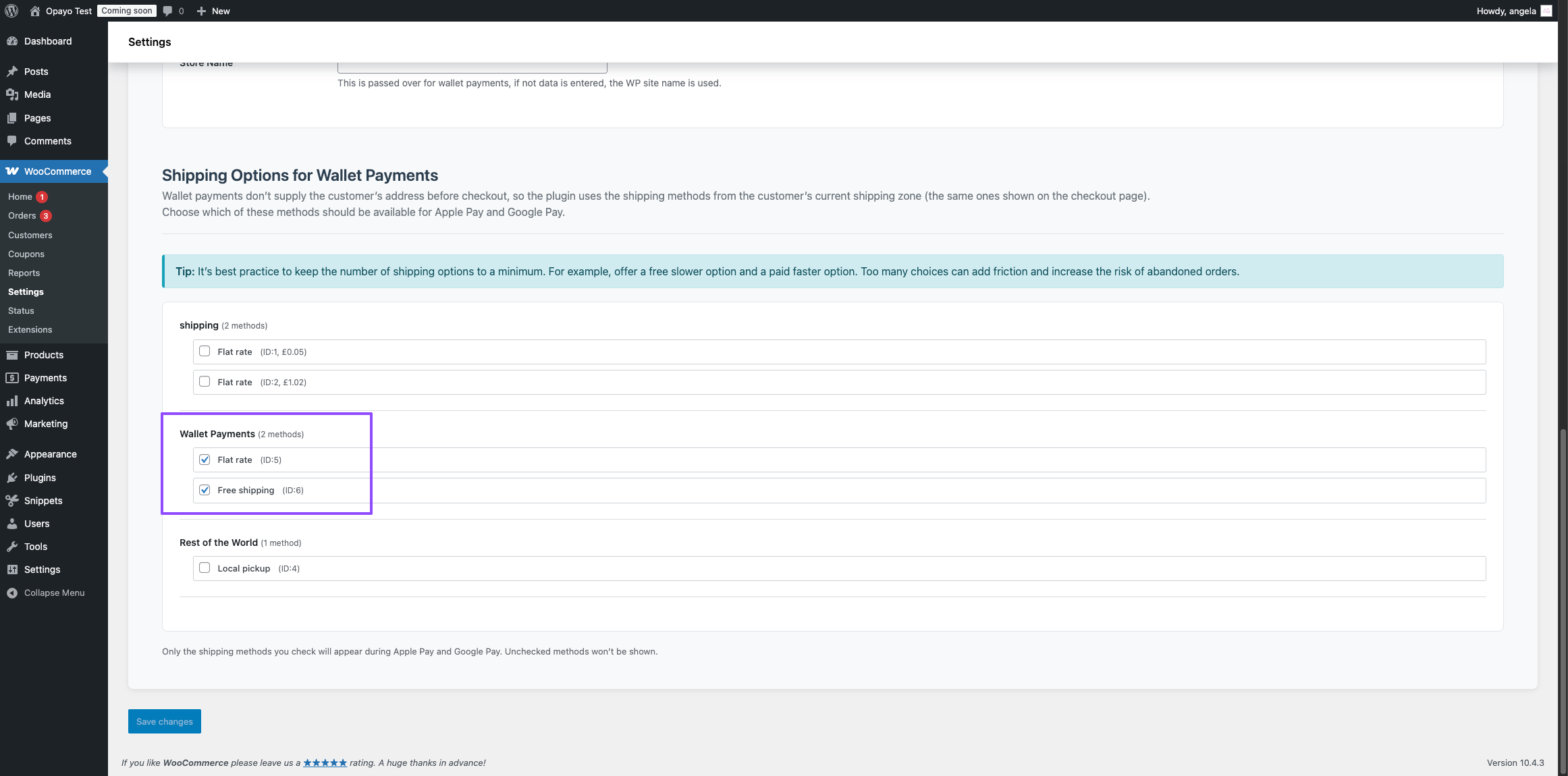
This section controls which shipping methods are shared with:
- Apple Pay
- Google Pay
Here you can:
- enable or disable individual shipping methods
- hide shipping zones that rely on postcodes
- allow the Wallet Payments zone to be shown instead
This ensures wallet customers see valid delivery options even when postcode-based zones cannot be evaluated.
Example setup
A common configuration looks like this:
| Shipping zone | Used for |
| UK Mainland (postcode-based) | Standard checkout only |
| Highlands & Islands (postcode-based) | Standard checkout only |
| Wallet Payments | Apple Pay & Google Pay only |
This allows:
- postcode logic to continue working normally at checkout
- wallet payments to use a simplified fallback shipping zone
Important notes
- The Wallet Payments shipping zone will not appear on the standard checkout page.
- It is only used when shipping methods are shared with Apple Pay or Google Pay.
- Wallet shipping options are controlled entirely from the plugin’s Wallet tab.
- If no compatible shipping options are available, wallet buttons may not appear.
Best practice tips
- Keep wallet shipping options to a minimum
- Avoid postcode-based rules for wallet payments
- Use clear, simple delivery labels (for example: Standard Delivery)
- Test Apple Pay and Google Pay after making shipping changes
Need help?
If wallet buttons aren’t appearing or shipping options are missing:
- confirm the Wallet Payments shipping zone exists
- ensure it contains at least one enabled shipping method
- review the Shipping Options for Wallet Payments settings
- check your existing zones for postcode-based rules
If you’re unsure whether your shipping setup is wallet-ready, our support team can help confirm it.
Was this helpful?


Opayo
Still need help?
Our team are on hand to provide fast, helpful and professional support.
Back End Demo
Start exploring our fully functional demo site today.
Gain exclusive admin access to see what's possible.