Setting up Traffic Light System
Introducing, the Traffic Light System – a recently added feature that provides a user-friendly interface that lets merchants check the order’s status with more details within it.
Order View:
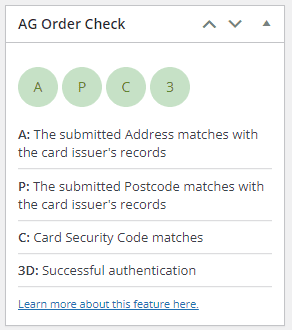
3D secure pass, other checks also passed.
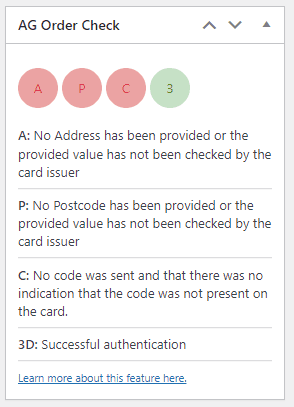
3D secure pass, other checks failed or had issues.
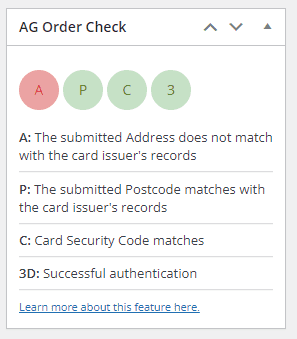
3D secure pass, other checks passed except for the submitted address that did not matched.
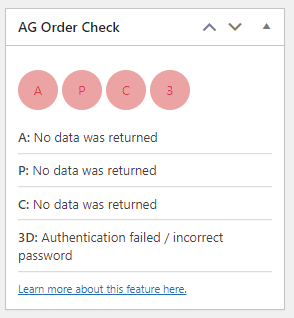
3D secure failed, no data was returned for other checks
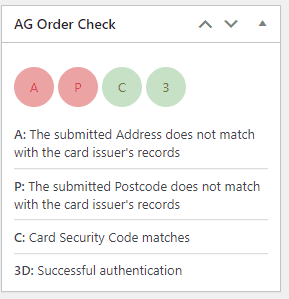
Both 3D secure and CVC (three digits on back of card) passed. Address and Postcode did not match.
Order table:

The AG Traffic light System is consisted of the following status checks:
- Address Check – Checks and provide the status of the submitted Address if it is matched with the card issuer’s records.
- Postcode Check – Checks and provide the status of the submitted Postcode if it is matched with the card issuer’s records.
- CVC Check – Checks and provide the CVC status of the account.
- 3D Secure Check – Checks and provide the order’s 3D Secure status
Enabling the Traffic Light System
To set the Traffic Light system up, proceed to your backoffice, head to Configuration->Technical Information-> Transaction Feedback. You need to select, and add these parameters in the “Dynamic e-Commerce parameters” field:
AAVADDRESS
AAVZIP
CVCCHECK
ECI
AAVCHECK

Please feel free to contact our support team if you have any questions regarding this new feature.
Was this helpful?